Daily Reality Check: how to build a day plan that doesn't fall apart by 10am

Reality Check is a free Notion custom agent that builds a realistic day plan from your tasks and calendar. The output is one key task and up to two secondary, with everything else deferred.
Updated July 2026.
Summary: Most day plans fail because they were built against aspiration rather than available time. Reality Check is a free Notion custom agent that reads your tasks and calendar, calculates what fits in your working window, and produces a plan built around one primary task, up to two secondary tasks, and an explicit overflow list with suggested dates. It doesn't compress the list or find creative ways to fit more in. If the day is overloaded, it says so before you find that out at 5pm.
You didn't run out of time. You started with a plan that didn't fit the day.
A workday holds one meaningful piece of work, maybe two. The rest is negotiation, and most day plans start that negotiation from the wrong position, listing everything that needs doing rather than what the available hours can absorb.
The result is predictable: the plan is aspirational at 9am and abandoned by mid-morning. Not because you got distracted or lacked discipline, but because the plan was built against what you wanted to do rather than what you had time to do.
Reality Check is a free Notion custom agent that starts from the constraint rather than the wishlist.
What a Notion custom agent is
Notion custom agents are AI assistants built into your Notion workspace which you can call upon by @mentioning them on any page. They can (with permission) read your databases, respond to context, and write outputs directly to your pages, without you copying data into another tool. They’re free until 3 May 2026 but requires a Plus plan or above.
The Reality Check agent checks your tasks and calendar (if you've connected one) then writes your day plan to a dedicated output page. It doesn't mark tasks complete or edit any properties. Every decision stays with you.
A normal plan versus a great one
What Reality Check produces instead:
Primary task: finish the client deck. It's due tomorrow, needs three hours, and is the highest-impact item in the window.
Secondary tasks: prep team meeting (45 minutes) and one pass on outstanding emails (30 minutes).
Everything else moves to Thursday with suggested dates.
Buffer: 20% of working time held back.
A typical overloaded plan:
Review competitor analysis
Finish the client deck
Prep the team meeting
Write the monthly report
Respond to all outstanding emails
Finish the onboarding doc
The workload doesn't get smaller. What changes is that you've made an explicit call about what today can hold, before the day makes that call for you.
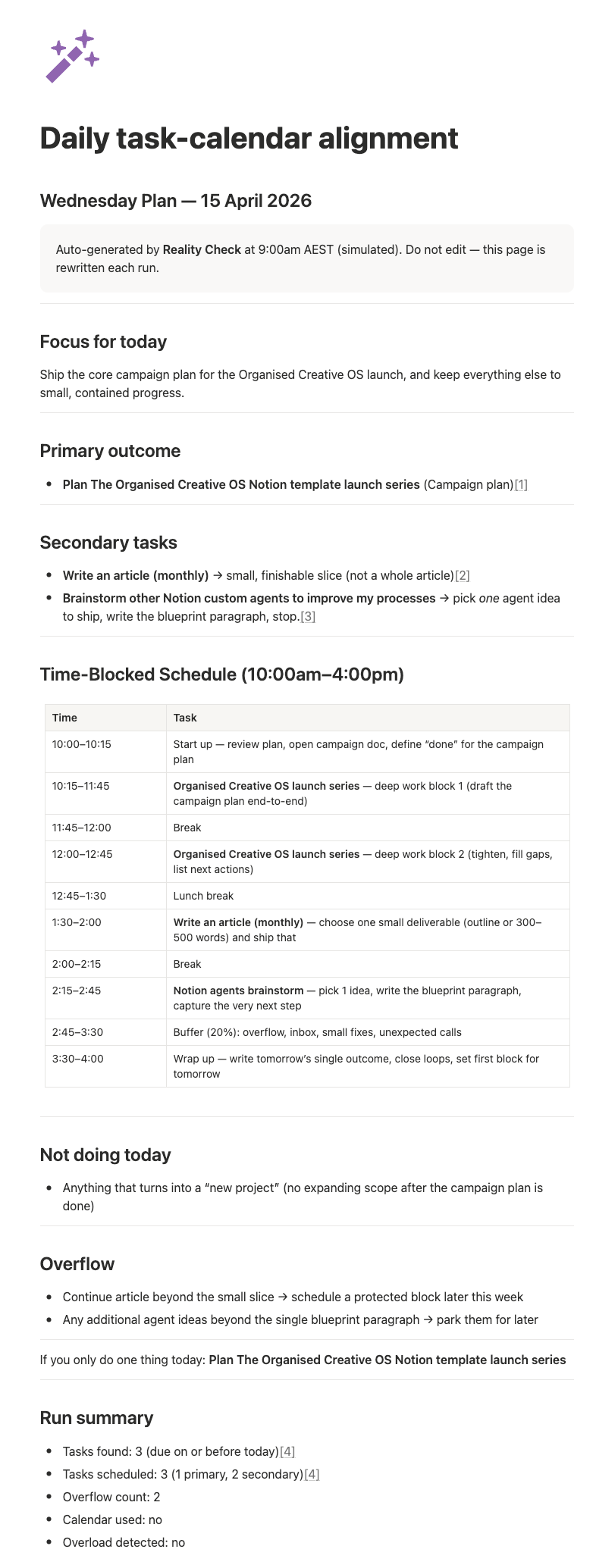
An example of the Reality Check agent output
It starts from a different constraint than most planners
When you run it, the agent determines your working window, blocks out calendar events, and calculates how much time is left. Then it selects one primary task and up to two secondary tasks based on what's overdue, due today, and highest impact. Everything else goes to overflow with a suggested date.
The 20% buffer isn't optional. It's what separates a plan that holds from one that collapses the moment something takes longer than expected, which it will.
The rule that's hardest to follow yourself
If the day is overloaded, Reality Check reduces scope. It doesn't compress time, move tasks earlier, or suggest workarounds. It removes work from the plan and makes that explicit.
You already know what won't get done. The delay in admitting it is where the damage happens. The tasks that slip don't change whether you acknowledge the overflow or not. What changes is whether you're surprised at 5pm or whether you made a call at 8am about what wasn't happening today and why. The latter leaves you in a much better position to reschedule, communicate, or reprioritise before the day runs away.
What the output looks like
The agent writes to a single page (Daily task-calendar alignment) and rewrites it each run, so you're always looking at a current plan. The page includes a one-sentence focus for the day, your primary task and secondary tasks, a time-blocked schedule with breaks and buffer, a list of what's not happening today with a reason, and an overflow section with suggested new dates. The final line is always: "If you only do one thing today: [primary task]."
On days when everything goes sideways, having one pre-made answer to "what matters here" is worth more than a carefully constructed schedule.
Running one focused planning session in the morning is also a more efficient use of AI than asking "what should I work on now?" three times during the day when the answer keeps shifting. Each exchange has an energy cost and a financial one. The goal isn't more AI. It's the right amount at the right moment, which for day planning means once, up front, with a clear output you can refer back to. An AI diet for your day: decide once, in the morning, with a clear output to refer back to.
What you need to get started
A Notion tasks database with Status, Due, Priority, and Impact properties. The agent can help you set this up in two minutes if you don’t already have one. Calendar connection is optional but improves accuracy. Without it, the agent assumes full availability across the working window (although you can also tailor the working window itself).
No Notion? The logic holds with any AI tool.
The same constraints work without the agent. Share your task list and any calendar commitments with Claude or whichever AI you use, specify your working window, and ask it to select one primary task and up to two secondary tasks based on priority and available time, with everything else deferred to a suggested date. You'll need to do the copying and pasting yourself, and the plan won't write to a page you can reference during the day, but the planning logic is the same.
The Notion integration is what makes Reality Check more useful as a habit. It reads your tasks directly, writes the plan to a page that rewrites itself on each run, and with write permissions extended, it can push due date changes back to your database, turning a planning suggestion into a system update.
A note on cost
Custom agents are currently in a beta testing period and free to use until 3 May 2026. From 4 May, they will require Notion credits at $10 per 1,000 credits as an add-on to Business and Enterprise plans. A daily planning session sits at the simpler end of the complexity scale: the agent reads your task database, checks your calendar, and writes to one output page, which involves fewer steps and less data than a more complex multi-tool workflow, and keeps credit usage lower. Use the free period to build the habit and get a feel for whether it's worth the ongoing cost.
Run it tomorrow morning and see what it cuts
Install the Reality Check agent free from the Notion marketplace. The useful moment is when it tells you what's not happening today. That's the part your old plan would have buried until 4pm.
FAQ
What is Reality Check?
A free Notion custom agent that builds a realistic day plan from your tasks and calendar. It works out how much time you have, selects what fits, and tells you clearly what won't get done and when to do it instead.
What's a Notion custom agent?
An AI assistant built into your Notion workspace. It reads your databases, responds to context, and writes outputs to your pages. Install from the Notion marketplace and call it by @mentioning it.
Do I need a paid Notion plan?
Custom agents require a Plus plan or above. They are currently in a beta testing period and free to use until 3 May 2026 on Business and Enterprise plans. From 4 May, custom agents will require Notion credits at $10 per 1,000 credits as an add-on. Reality Check reads your task database and calendar then writes to one output page, a relatively straightforward operation, and running it once a day keeps per-session credit usage consistent and predictable.
Can I do this without Notion?
Yes. Share your task list and calendar commitments with any AI tool, specify your working window, and ask it to select one primary task and up to two secondary tasks with everything else deferred to suggested dates. The Notion agent automates the data reading, writes the plan to your workspace, and can be extended with write permissions to update task due dates directly.
What properties does my database need?
Status, Due, Priority, and Impact are required. Assignee is optional. If your database uses different property names, you'll need to rename the columns before setup.
What's the default working window?
10am–4pm local time. This is adjustable.
Do I need to connect my calendar?
No, but it makes the output more accurate. Without it, the agent assumes full availability. With it, it blocks events and calculates remaining time before building the plan.
Will it edit my tasks or mark things complete?
Not by default. It reads and suggests. With write permissions extended, it can push due date changes back to your database.
How often should I run it?
Daily, either as a morning routine or when the day is already feeling out of control. Each run rewrites the output page.
How is this different from a to-do list?
A to-do list records what you want to do. Reality Check builds a plan based on available time, calendar commitments, and task priorities, and tells you what won't happen today before you find out the hard way.
Day plan sorted? Now sort the rest of your workflow
Reality Check builds a plan from what your day can actually hold. Good systems do the same for everything else.
Could you use a central hub for your freelance work?
The Organised Creative Notion Template helps you track projects, manage deadlines, and store important info so your days start from what's real, not what's aspirational.
EXPLORE THE TEMPLATE →
How about systems that work across your whole life?
The Most Organised Person I Know shows you how to design simple systems that reduce mental load and help your work flow more smoothly, from daily tasks through to long-term projects, at work and at home.
GET THE EBOOK →
Because a plan built against available time beats a wishlist every time.