How I built a Notion Custom Agent to read my newsletters for me

I had 177 unread newsletters, so naturally I built an app for that.
Updated August 2026.
Summary: Notion's Custom Agents (currently in public beta, free until 3 May 2026) let you connect Gmail, run logic, and update your databases using plain English and no code. My first agent processed three months of unread newsletters into structured digests. Here's what it surfaced, and how to build your own.
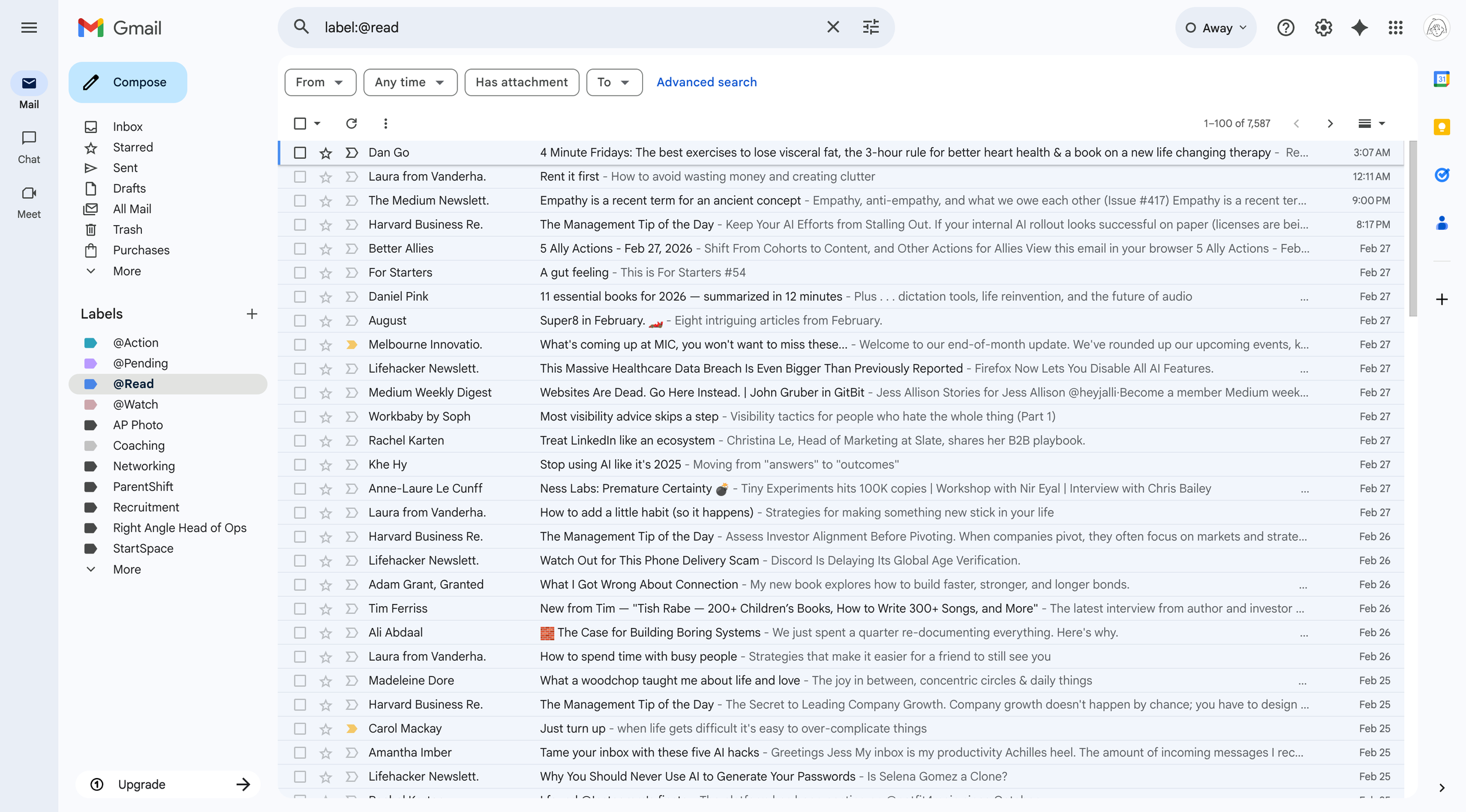
The problem: 7,587 emails piled up in my reading backlog
I subscribe to more newsletters than I read. You probably do too.
The intent is good (stay informed, keep the ideas flowing) but the reality is a growing Gmail label called @Read that I visit approximately never. Even after a ruthless unsubscribe phase, without really noticing I'd signed up for a few more things, and a few more after that. By the time I ran this agent across three months of backlog, December had 62 items, January had 51, and February had 177.
The trickier issue is quality variance. Some newsletters are always useful. Others are worth reading maybe 25% of the time. I don't want to unsubscribe, but I can't justify reviewing each one manually to find the good stuff.
There's also a practical angle: I pay for Notion already, and Gmail storage isn't free forever. Moving email content into a database where I can search, filter, and act on it makes more sense than letting it pile up in a label.
Custom Agents run without you — they're triggered, not prompted
Custom Agents launched in public beta on 25 February 2026. They're different from the AI features you might already use in Notion — like inline AI or meeting notes, which respond when you ask them to. Custom Agents run on instructions you write once, then get triggered by a time or event, connecting across tools like Gmail, Slack, Calendar, and Notion databases without manual prompting.
It's less like asking an AI a question and more like onboarding a literal-minded assistant who does exactly what you tell them, every time.
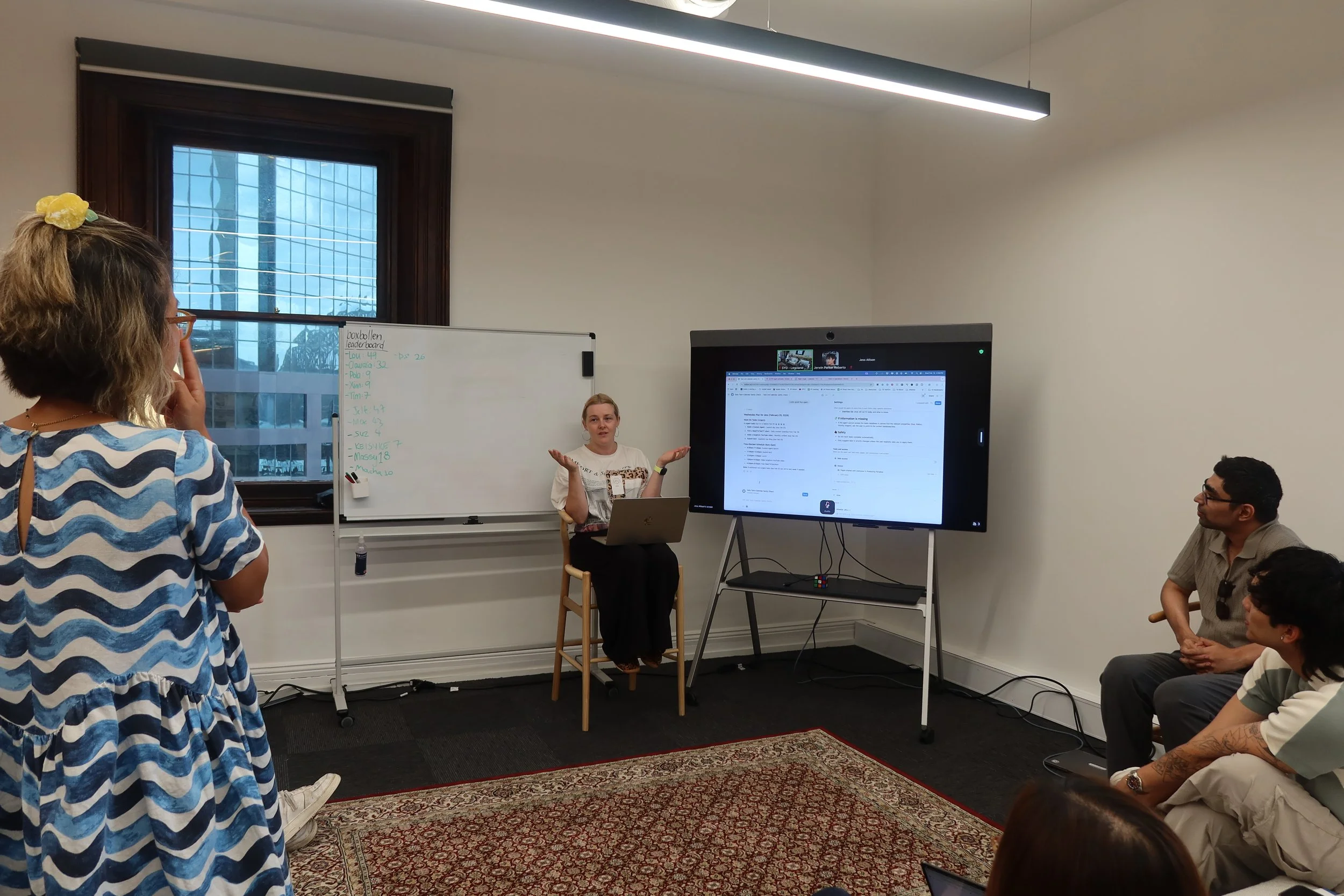
Presenting an early custom agent idea at the Notion HQ in Sydney
A few weeks ago I was invited to the Notion office in Sydney as part of a small group of template creators getting an early preview of what was coming. Custom Agents are one of those features where I didn't really get what they'd feel like in practice until I had my hands on them. When they launched publicly, this was the first thing I built.
Custom Agents are on Business and Enterprise plans, including Business trials, and free to use through 3 May 2026.
What it does while you're not looking
When I ask it to process a particular month, it scans Gmail for emails with the label @Read that arrived in that month, using Melbourne time so nothing slips through timezone gaps. It processes in batches of 20, so large months like February don't time out or stall.
For each email, it checks whether a record with that Gmail Message ID already exists in my Notion database — and skips it if it does. Subject lines aren't unique enough for this; Message IDs are.
For new emails, it creates a record with the subject, sender, a normalised sender name (more on that below), date received, a one-to-two sentence summary, the most interesting idea in the context of my work, any links mentioned, a relevance tag (PP, day job, both, personal learning, or low signal), and a concrete action if there is one. Then it relabels the email in Gmail from @Read to @Summarised.
Once all emails are processed, it creates or updates a monthly digest page with a summary, top five insights, three ideas for Producing Paradise, three for my day job, and two to four themes across the batch — all grouped by category, filtered to exclude low-signal content, and written as a standalone readable page rather than just a row of database properties.
I also have it set on a daily 5am Melbourne trigger so ingestion can happen before I'm online. But month-by-month manual runs are available for backlog catch-up.
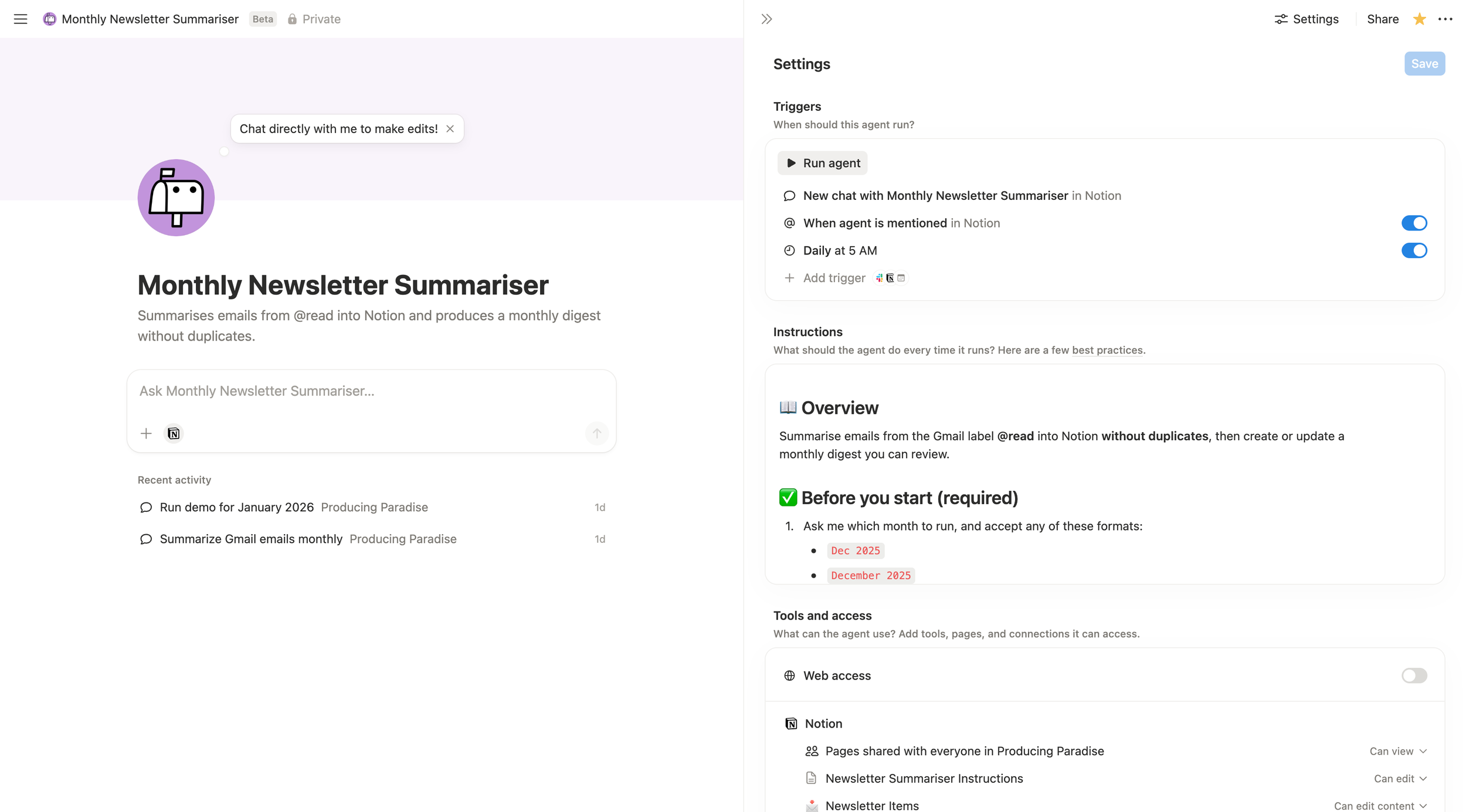
My monthly newsletter summariser agent

Bonus cool thing: newsletters plotted on calendar based on when received
Several rounds to get it right: what changed and why
The instructions took about 20 minutes to write initially, but the first run processed only 10 newsletters per month and stopped. I went back and was more explicit about processing the full month in batches of 20, tracking running totals across batches, and continuing until everything was done.
The second change was making re-runs safe. Without explicit deduplication logic, running the agent twice for the same month would create duplicate rows and duplicate relation entries on the digest page. I added a strict check on Gmail Message ID before any new row gets created, and a separate URL-based set check before adding items to the digest relation. Re-runs now only add what's new and refresh the digest content.
The third change was sender normalisation. Different senders from the same publication come through with slightly different display names — "HBR on Leadership" one week, "Harvard Business Review" the next. Without normalisation, they'd end up as separate categories in the database. I added a smart grouping layer: known senders map to clean names (HBR, Medium, Luminary, etc.), and for anything new the agent strips suffixes like "from [Publication]" or "on Substack" and creates a clean option if nothing fits. New options get flagged in chat so I know to review them.
The fourth change was adding the category layer. The agent checks how previous newsletters from the same normalised sender have been tagged and applies the same category automatically, or makes its best guess for new senders. Before this, insights sat in a flat list and I had to do the sorting myself. After it, the digest is organised by context — business and leadership, health and personal growth, fashion — and the PP and day job idea sections cluster meaningfully rather than being a random mix.
The fifth change was the digest page itself. Early versions just updated database properties. I added a rich page content layer: callout blocks for the summary and ideas sections, numbered top insights that link back to individual newsletter item pages, and a linked database view at the bottom filtered to just that month's items. It's now readable as a standalone document.
Finally, I added error handling. If a Gmail API call fails mid-batch, the agent reports which batch failed and how many were already processed. If a Notion page create fails, it logs the subject and Message ID, skips that email, and continues. Re-runs are always safe. The deduplication logic means nothing gets doubled up regardless of what happened on the previous run.
All of this in plain English, no code. That's the thing about agents: the first version doesn't have to be perfect. You can see what it gets wrong and just tell it.
Three months of backlog, processed in one sitting
I ran all three months on the same day. December and January were run in batches while I was still testing, so those figures don't reflect the full month.
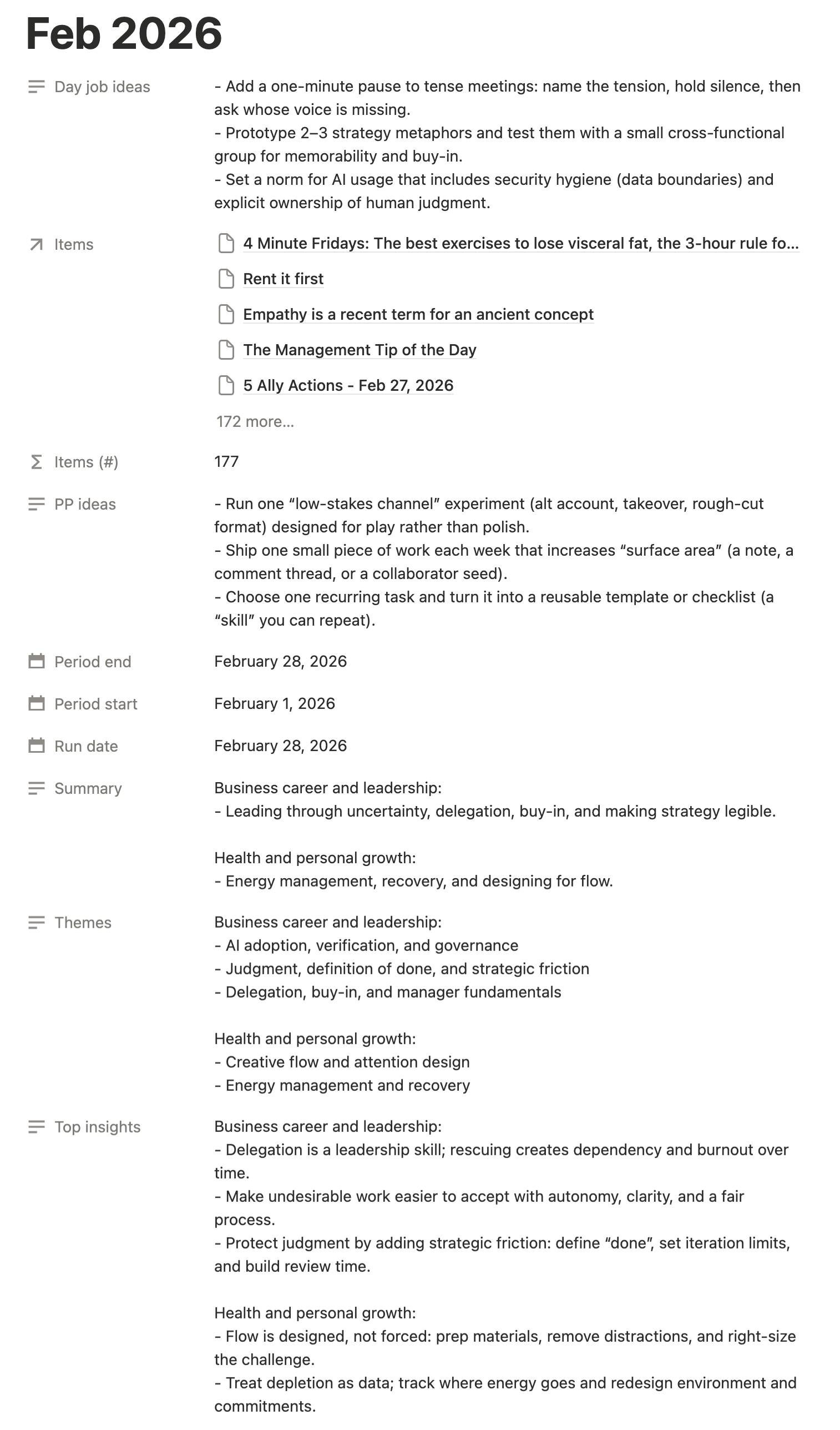
A summary of ideas from newsletters I received in Feb 2026
December was mostly end-of-year content. The agent correctly flagged deal roundups and tech emails as low signal. The themes it surfaced were accurate: manager fundamentals, end-of-year reflection, attention and distraction design. One insight — "consistent management cadence beats heroic effort; set clear 1:1 rhythms and address issues early" — went directly into a Right Angle ops review I was already prepping. I wouldn't have gotten there without the digest.
January came out with four themes: confidence through exposure, execution quality and speed, kindness and emotional resonance in content, and systems that reduce relearning. The PP ideas were specific enough to use directly: test a kindness-first content concept, write the frame before the execution, build a swipe file of memorable brand moments. Two of those three made it into my content planning for the following week.
February's 177 items were the fullest run. The summary noted "AI everywhere but with a more grounded tone: security and verification over hype, with judgment and review as the new bottleneck." The top insight was: "if output becomes cheap, judgment becomes expensive. Invest in review, critical thinking, and writing to clarify decisions." That framing has shown up in how I've been thinking about this business since.
There was also a small moment of recursion I enjoyed: the Notion "Custom Agent templates are here!" launch email appeared in the February digest, summarised and tagged as relevant. The agent processing a newsletter about itself on the day I built it felt appropriately 2026.
The content creator vs day job split is the feature I'll use most. I run two things simultaneously: a 15-person studio during the week, and Producing Paradise on Wednesdays. Context-switching between them is its own overhead. Having the agent pre-sort ideas into those two buckets saves a step I used to do manually, or more often, skip entirely.
What it doesn't do: catch emails that arrive outside the label, or tell me which senders are worth keeping. Over time, the relevance tags will start to tell that story. A sender who consistently tags as low signal is a candidate for unsubscribing, but I'll let the data build before I act on it.
Note: Notion flags prompt injection as a consideration, where hidden instructions in content the agent reads try to manipulate what it does. For a newsletter digest the risk is low, but keep agent scope tight. Notion logs every run, so you can see exactly what happened.
Build your own
You'll need:
A Notion Business or Enterprise plan (including trials, free during beta until 3 May 2026)
Gmail connected to Notion via the integrations panel
Two Notion databases: one for individual newsletter items, one for monthly digests
A Gmail label system — I use @Read as the input and @Summarised as the output
The instructions I wrote are below. Copy and adapt freely. Key things to keep if you're modifying for a different setup: the duplicate-check logic using Gmail Message ID rather than subject line (subject lines aren't unique, Message IDs are), the batching rule so large months don't stall, the timezone specification, and the explicit instruction not to proceed without a confirmed month. That last one sounds minor, but without it the agent will try to process your entire inbox history.
Full agent instructions
📖 Overview
Summarise emails from the Gmail label @read into Notion without duplicates, then create or update a monthly digest you can review.
✅ Before you start (required)
If triggered by chat
Ask me which month to run, and accept any of these formats:
Dec 2025
December 2025
2025-12
Normalize the month internally to a year-month period.
Confirm the time zone is Australia/Melbourne.
Confirm you will only process emails currently in @read that fall within that month (based on Australia/Melbourne time).
If I do not provide a month, do not proceed.
If triggered by schedule (daily recurrence)
Determine today's date in Australia/Melbourne.
Check whether the previous month's digest already exists in 🗓️ Monthly Newsletter Digests:
If no digest exists for the previous month: process the previous month first.
If a digest already exists for the previous month: process the current month (emails received so far this month).
Do not ask for confirmation — just run silently and post the output summary to chat when finished.
Month validation (strict rule)
Before processing, confirm the requested month is not in the future relative to today's date in Australia/Melbourne.
If the month is in the future (e.g. "March 2030" when today is March 2026), refuse to proceed and explain why.
The current month is always valid (you process emails received so far).
🧾 Inputs and outputs
Gmail
Input label: @read
Output label: @summarised
Notion databases
Newsletter items: 📩 Newsletter Items ()
Monthly digests: 🗓️ Monthly Newsletter Digests ()
🔁 How to process emails (for the specified month)
Batching (strict rule)
Process emails in batches of 20.
For each batch: collect up to 20 emails from @read for the target month, create Notion records, relabel in Gmail, then move to the next batch.
Continue until all emails for the month have been processed.
Track running totals across batches (added, skipped) and report the final totals at the end.
1) Collect emails
Find all emails with Gmail label @read.
Filter to emails received within the specified month (Australia/Melbourne time).
Take the next batch of up to 20 unprocessed emails.
2) Prevent duplicates (strict rule)
For each email:
Read its Gmail Message ID.
Search the 📩 Newsletter Items database for a row where Gmail Message ID exactly matches.
If a match exists: skip it. Do not create a new item.
If no match exists: create a new item and fill all fields below.
3) Create the Notion record (one per new email)
Create a new row in 📩 Newsletter Items with:
Subject (title)
Sender
Sender Email
Sender (normalised): Map the raw sender to the correct normalised select option. Apply smart grouping:
"Harvard Business Review", "HBR on Leadership", "HBR on Strategy and Execution" → HBR
"Medium Weekly Digest", "The Medium Newsletter" → Medium
"Block by Block from Marie-Pier Rochon", "Marie-Pier Rochon on Substack" → Marie-Pier Rochon
"Emma Blomkamp", "Emma Blomkamp at New Know How" → Emma Blomkamp
"Adam from Luminary", "Marty from Luminary" → Luminary
For all other senders: match to the closest existing option, stripping suffixes like "from [Publication]", "on Substack", "at [Company]", or ", [Title]".
If no existing option fits, create a new select option in the Sender (normalised) property on the 📩 Newsletter Items database using a clean, human-readable name (e.g. "superfuture", "The Hustle"). Then set that option on the item. Report newly created options in the chat output so the user is aware.
If in doubt, always use the person's name (e.g. "Ali Abdaal") as the normalised option.
Date received
Exec summary (1 to 2 sentences, plain language)
Most interesting idea (focus on relevance to Producing Paradise and/or day job)
Links mentioned (list URLs found in the email, one per line if possible)
Relevance: Content creation, Day job, Both, Personal learning, or Low signal
Category:
If there are existing Newsletter Items from the same Sender (normalised): apply the same Category they use.
Otherwise: make your best guess and select the most relevant Category.
Action to take: a concrete next step if there is one, otherwise None
Gmail Message ID
Gmail Thread ID
Summarised: checked
4) Relabel in Gmail (new emails only)
After creating the Notion row for a new email:
Remove label @read
Add label @summarised
Never relabel emails that were skipped due to deduping unless I explicitly ask.
🗓️ Create or update the monthly digest
In 🗓️ Monthly Newsletter Digests ():
Find the digest page where Month matches the specified month.
The digest page title must be formatted as MMM YYYY (example: Dec 2025).
If the user input is YYYY-MM or Month YYYY, still create/find the digest using MMM YYYY format.
If an older digest exists with title YYYY-MM, update its title to MMM YYYY rather than creating a duplicate.
Always update:
Run date = today (Australia/Melbourne)
Period start = first day of the month
Period end = last day of the month
Update Items (with idempotency guard):
First, read the existing Items relation list on the digest page.
Build a set of all URLs already in that list.
For each Newsletter Item created in this run, only add it to the relation if its URL is not already in the set.
Write the final deduplicated list back. This ensures re-runs never create duplicate relation entries.
CEO mode:
Do not include low-signal content in Summary, Themes, Top insights, Content creation ideas, or Day job ideas.
Prioritize sharp, actionable cutthrough that is useful for running a small business and being an effective knowledge worker.
Category interpretation:
Fashion: dressing for work and your personal brand
Business career and leadership: running a small business, freelance work, professional development, knowledge work
Health and personal growth: being a better human, better member of society, life skills, work-adjacent skills
Always refresh these properties (even on re-run) so the digest reflects the latest set of included items:
Summary: 3 to 5 bullets covering what the month contained
Only include a Category if something meaningful surfaced in that Category.
Formatting: Use Category headings with bullets underneath.
Do not format as "Category: item" bullet lines.
Example:
Business career and leadership:
…
…
Top insights: top 5 actionable takeaways
Only include a Category if something meaningful surfaced in that Category.
Formatting: Use Category headings with bullets underneath.
Content creation ideas: 3 ideas to apply to content creation
Tag each bullet with the Category.
Formatting: Use Category headings with bullets underneath.
Day job ideas: 3 ideas to apply to day job
Tag each bullet with the Category.
Formatting: Use Category headings with bullets underneath.
Themes: 2 to 4 themes noticed across emails
Group by Category when possible.
Formatting: Use Category headings with bullets underneath.
Example:
Business career and leadership:
AI adoption, verification, and governance
Judgment, definition of done, and strategic friction
Delegation, buy-in, and manager fundamentals
Health and personal growth:
Creative flow and attention design
Energy management and recovery
Other (role-relevant):
If an insight does not fit neatly into one of the three Categories but is still relevant, call it out separately here.
📄 Write rich digest page content
After updating the digest properties, also write or refresh the page content of the digest page. This makes the digest readable as a standalone document rather than just a row of properties.
Structure the page content as follows:
Format
Summary — use a callout block with a 📋 icon, then the Summary bullets underneath.
Top insights — heading with numbered insights, each linking back to the relevant Newsletter Item page where possible.
Themes — heading with bullets grouped by Category.
Content creation ideas — heading with a callout block (🟣 icon), bullets grouped by Category.
Day job ideas — heading with a callout block (🔵 icon), bullets grouped by Category.
Other (role-relevant) — heading with bullets, only if there is content.
Items this month — a linked database view of 📩 Newsletter Items filtered to the items in this digest's relation, displayed as a table showing Subject, Sender (normalised), Category, Relevance, and Exec summary.
Rules
Use bold for Category subheadings within each section.
Where possible, mention links back to individual Newsletter Item pages using page mentions.
On re-runs, replace the entire page content so it reflects the latest data.
📤 Output to the user (in chat)
When finished, report:
The month processed
How many emails were added
How many emails were skipped due to duplicates
Any senders that could not be mapped to a Sender (normalised) option, and any new options that were created
A link to the monthly digest page
⚠️ What to do when things go wrong
Gmail errors
If Gmail search returns zero results for the target month: report "No emails found in @read for [month]" and stop. Do not create or update the digest.
If a Gmail API call fails mid-batch: report which batch failed, how many emails were already processed, and suggest re-running the same month (deduplication will prevent double-processing).
Notion write errors
If a Notion page create fails: log the email subject and Gmail Message ID in chat, skip that email, and continue with the rest of the batch.
At the end, list all skipped-due-to-error emails so the user can address them.
Digest update errors
If the digest page cannot be found or created: report the error and still provide a count of how many Newsletter Items were successfully created. The user can then manually trigger a digest-only re-run.
Re-run safety
Re-runs of the same month are always safe because:
Email deduplication uses Gmail Message ID (no duplicate items).
Digest relation updates use set-based deduplication (no duplicate links).
Digest properties and page content are fully refreshed each time.
If in doubt, tell the user: "You can safely re-run this month. Existing items won't be duplicated."
Partial failures
If you complete some batches but fail on a later batch, always report:
How many emails were successfully processed.
How many remain unprocessed.
That re-running will safely pick up where things left off.
From inception to completion
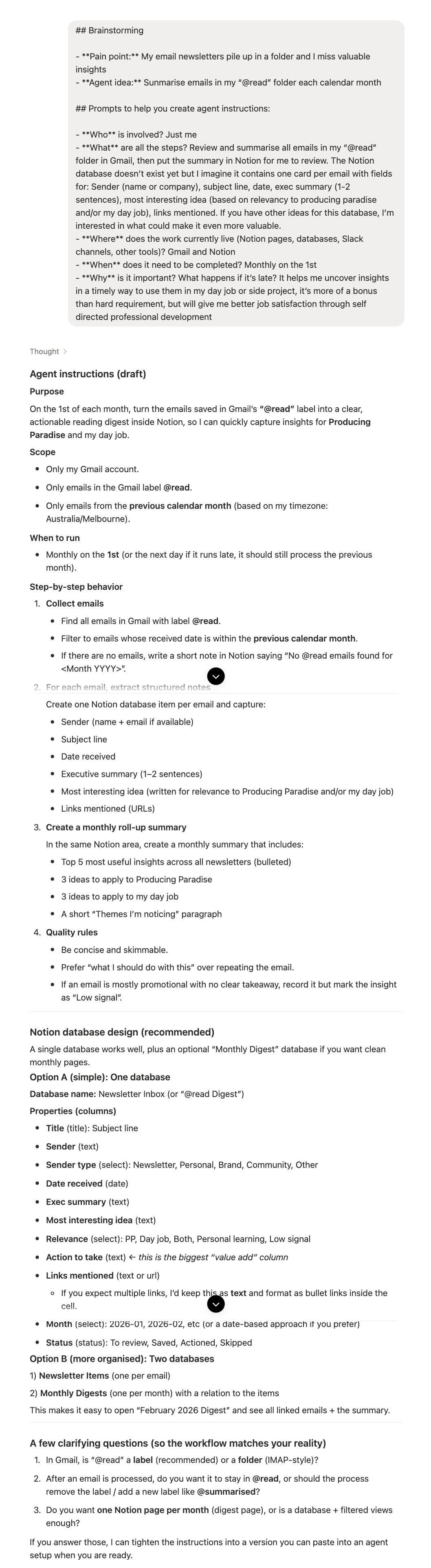
My very first prompt for this agent
Starting idea: build an agent that takes newsletters already triaged in Gmail, turns each email into a structured item in Notion, and produces a monthly digest you can skim for decisions and actions.
What changed along the way:
Defined a clear pipeline: Gmail @Read → one Notion item per email → move to Gmail @Summarised → update a monthly digest page
Added batching (20 emails per run) so large months process reliably without stalling, with running totals tracked across batches
Made it safe to re-run by enforcing strict deduplication on Gmail Message ID before creating rows, and URL-based set deduplication before adding items to the digest relation
Added sender normalisation — smart grouping of known publishers, suffix-stripping for unknown ones, automatic creation of new select options with a chat flag when something new is encountered
Added a Category field with automatic carryover from the same sender's previous items, which made the digest outputs sort themselves
Shifted the digest to "CEO cut-through": removed low-signal content from outputs, redefined categories around real roles (business and leadership, health and personal growth, fashion)
Upgraded the digest from a row of properties to a rich page — callout blocks, numbered insights linking back to source pages, a live filtered database view
Added error handling for Gmail API failures, Notion write failures, and partial batch failures, with re-run guidance in each case
Standardised month handling: digest titles formatted as MMM YYYY, agent accepts multiple input formats and normalises internally
Added a daily 5am Melbourne trigger so ingestion can happen before I'm online, while keeping month-by-month manual runs available for backlog catch-up
Five other workflows you could build the same way
The newsletter digest is a contained use case, which made it a good first build. The thing that makes it work is tight scope — and the same applies to all of these.
A repeat questions agent that monitors a Slack channel and answers recurring questions from your documentation — useful for onboarding, IT, or any team that fields the same five questions on rotation.
A task routing agent that triggers from an emoji reaction and creates, prioritises, and assigns a task without anyone touching Notion manually.
A weekly status report that compiles a digest from your project databases every Monday morning so team leads start the week with context, not admin.
A meeting note processor that picks up transcripts as they land, extracts action items, and links everything to the right project and person.
A knowledge base auditor that flags documentation older than 90 days and checks whether it still reflects current practice.
Freestyle your own agent
Answering these questions will help shape an accurate result off the bat.
Pain point: What's the thing you're currently doing manually, inconsistently, or not at all?
Agent idea: What would it do?
Who is involved? You, your team, external tools?
What are all the steps? Write them out linearly before you write the instructions.
Where does the work currently live? Notion pages, databases, Slack channels, Gmail, other tools?
When does it need to run? On a schedule, triggered by an event, or on demand?
Why does it matter? What happens if it doesn't run?
FAQ
Do I need to know how to code to set this up?
No. The agent instructions are written in plain English. You'll need to set up the Notion databases with the right fields, but there's no coding involved.
Do I need a paid Notion plan?
Custom Agents are available on Business and Enterprise plans and run on Notion Credits. For current pricing and how credits work, see Notion's Custom Agents pricing guide.
What if I want to process emails from a different label?
Update the instructions to reference your label name. The logic stays the same.
Will it work with email providers other than Gmail?
Currently Notion's Mail integration supports Gmail. Other providers may come later.
What happens if I run it twice for the same month?
It skips any emails already in your database (matched by Gmail Message ID) and only adds new ones. The digest relation uses URL-based set deduplication too, so you won't get duplicate links even if you re-run. The digest content refreshes to reflect the latest full set of items.
Can I add more fields to the newsletter items?
Yes. Add the field to your Notion database and update the agent instructions to describe what you want it to populate. The more specific you are, the better the output.
How long does it take to run?
Depends on volume. Emails are processed in batches of 20, so a month like February with 177 items runs in multiple passes. Each batch takes a few minutes. For a large backlog, expect to re-run it in stages or let the daily scheduled trigger work through it.
What happens if I run out of credits?
All Custom Agents pause until the next monthly reset or until a workspace admin adds more credits. Scheduled runs during that window are skipped and don't run retroactively. See Notion's guide for how to monitor and manage credit usage.
What's prompt injection and should I be worried?
It's when hidden instructions in content the agent reads try to manipulate its behaviour. For newsletters the risk is low, but keep agent scope tight and don't point agents at unfamiliar external content without reviewing it first. Notion has detection built in and logs every run.
Built an agent to read your newsletters? Now build systems for the rest
Automating your reading backlog is one win. Having the rest of your work run smoothly is the bigger one.
Could you use a central hub for your freelance work?
The Organised Creative Notion Template helps you track projects, manage deadlines, and store important info so you spend less time on admin and more time doing the work.
EXPLORE THE TEMPLATE →
How about systems that work across your whole life?
The Most Organised Person I Know shows you how to design simple systems that reduce mental load and help your work flow more smoothly, from daily tasks through to long-term projects, at work and at home.
GET THE EBOOK →
Because the best automations free you up for the work that matters.