How to manage your Christmas gift budget and ideas using Google Sheets

Here's how to track gift ideas and manage your Christmas gift budget with help from a spreadsheet. Ho ho ho!
Summary: Gift budgets slip when ideas, prices and purchases live in different places, because you can't see a running total. One Google Sheet with a row per gift fixes that. Give each person a budget, mark each gift 'Purchased' or 'Unpurchased', and use formulas to show your total budget, what you've spent and what's left. Reuse the file each year and you also have a record of what you've given people before.
Every year, I...
Reboot my Christmas list file
Create a new tab for this year, and
Start filling in gift ideas and a list of people I'm going to buy for.
This year I thought I'd setup a template version, in case it's helpful for anyone else out there! 😘
Manage your Christmas gift budget
Here's the video (9min), where I run through the list setup and how to use it:
Here's what's covered:
0:25 Setting up the spreadsheet
0:36 Suggested fields: who it's for, supplier, item, cost/budget, purchased, link and notes
1:00 Demo present entry
1:38 Adding the people you want to buy presents for
2:10 Setting all as 'unpurchased' to begin with
2:23 Allocating a budget for each person
3:15 Using conditional formatting to highlight purchased vs unpurchased
3:36 Calculating the total present budget, amount spent to date and cost remaining
5:10 How to update as you buy things
5:47 How to add a new person to the list
7:35 When to use
8:00 Benefits of a repeating list: seeing what you've bought for people before!
The 'Present list spreadsheet' is available as a template in Google Drive now, so feel free to make a copy via this link — and check out our other free templates too!
Use one row per gift
Each gift gets one row with seven columns: who it's for, supplier, item, cost/budget, purchased, link and notes. The supplier and link columns save you searching for where you saw something. Use notes for sizes, colours, and 'check if they already have this'.
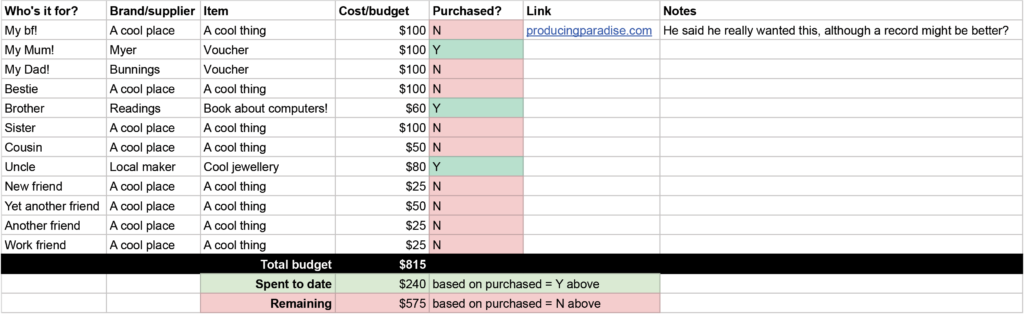
Example Christmas gift list
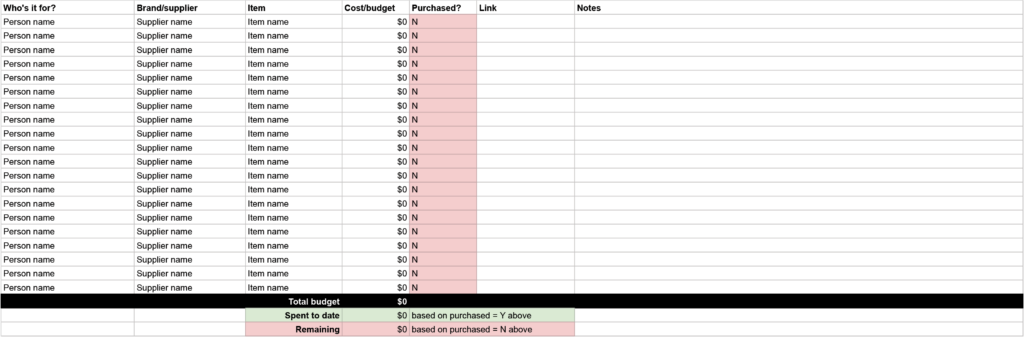
ACTIVITY: In a blank Google Sheet, add these seven headings across the top row, then fill in one gift you already have in mind.
| Who it's for | Supplier | Item | Cost/budget | Purchased | Link | Notes |
|---|---|---|---|---|---|---|
| Your person | Your shop | Your idea | Your amount | Unpurchased | Your link | Your notes |
Set each person's budget first
Add everyone you're buying for, set every row to 'Unpurchased', and give each person a budget. With the numbers on the page, you can catch an expensive idea while it's still easy to change. A 50-dollar idea looks different when the budget for that person is 30.
Let colour and formulas track your spending
Conditional formatting colours each row by status, so you can see what's still to buy. Three formulas then give you your total present budget, the amount spent to date and the cost remaining.
A SUMIF formula adds up only the rows marked 'Purchased'. If your cost/budget column is D and your purchased column is E, it looks like this:
=SUMIF(E:E,"Purchased",D:D)
Change the column letters to match your sheet. Subtract the result from your total budget to get what's left.
ACTIVITY: Above your list, add three cells labelled 'Total budget', 'Spent to date' and 'Remaining'. Put your overall budget in the first, the SUMIF formula in the second, and the first minus the second in the third. Then add a conditional formatting rule to the purchased column that changes the row colour when it says 'Purchased'.
Update the sheet when you buy
When you buy something, change its status to 'Purchased' and enter what you paid. The row colour changes and the spent and remaining numbers update.
If someone new joins your list, add them with a budget and every gift set to 'Unpurchased'. The video shows how at 5:47.
Last year's tab shows what you've already bought
Every year I add a new tab to the same file, so the old tabs are still there. Before I decide what to buy someone, I can look at what I gave them before.
Make your own copy via the 'Present list spreadsheet' link, and check out our other free templates too.
FAQ
How do I get the template?
Open the 'Present list spreadsheet' link. It copies to your Google account as a private file, so you can change it however you like and the original stays untouched.
Do I start a new file every year?
I add a new tab to the same file. That keeps previous years' lists in one place, so you can look back at what you gave people.
What should I put in the notes column?
Anything you'd otherwise try to remember: sizes, colours, whether someone already owns something similar, or when a sale ends.
Christmas list sorted? Now the rest of your year
A list where every gift has one place and one status cuts down what you have to remember. The ebook applies that idea to the rest of your week.
Want to see how that works beyond Christmas?
The Most Organised Person I Know shows you how to design simple systems that reduce mental load, from daily tasks through to long-term projects.
GET THE EBOOK →
Build systems that help you achieve financial clarity and business success.