The Qantas points value sorter I built with Claude (and the prompt to make yours)

Qantas points are worth 0.42c to 0.88c in the Marketplace. I used Claude to sort all 1,310 Points Sale items by value, and here's the prompt.
Summary: Shopping sites choose how you can sort their products, so the view you need for a decision doesn't always exist. The Qantas Marketplace Points Sale has 1,310 items across 55 pages, with no way to sort by points price or discount, and no sign of what each point is worth. I pasted the link into Claude with one line of frustration, and about fifteen minutes later had a private web page listing every item, sortable by cents per point. It changed my answer, because a coffee grinder and a $100 HelloFresh card get $449 of value from points that would have bought $300 of meal kits. On any site with the wrong sort menu, name the decision, name the missing column, and ask for a throwaway tool.
This is the story of how a sort menu wasn’t doing what I wanted, and how I built a tiny web app with Claude so I could make a better decision with my Qantas points.
So, Qantas was running a 50% bonus on top-up points, and I wanted to know whether this offer would be of any value to me, since I had about 65,000 points sitting there and we buy HelloFresh anyway. Like, could I make my existing Qantas points go further by ‘topping them up’?
Claude worked it through: bought points would cost 1.82c each, and a HelloFresh gift card returns 0.49c per point, so $2,730 of top-up would become about $735 of meal kits. (To put it simply, the top-up points were not a good deal when applied to the gift cards). I left the top-up points page, and started perusing the Points Sale to see what else my existing points balance could get me.
Qantas decides how you can sort, so bring your own view
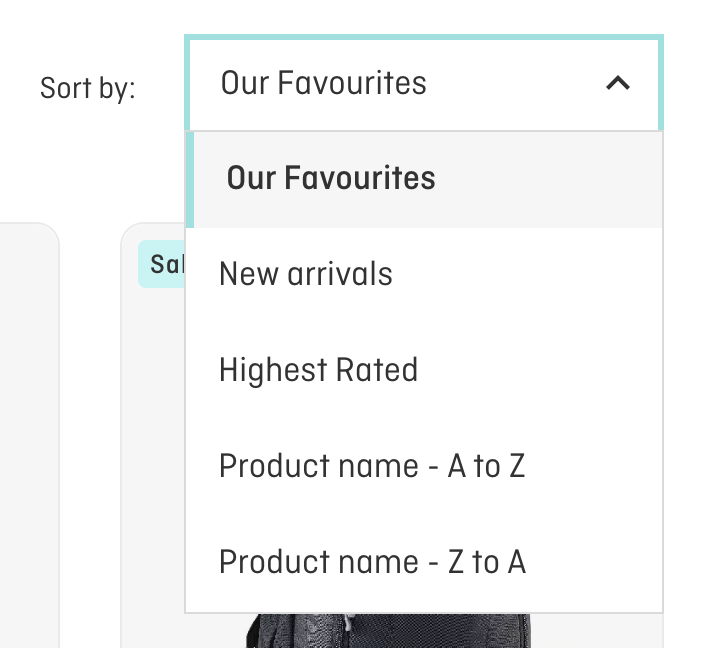
Sort by favourites new rating or name
The Points Sale had 1,310 products, 24 to a page, across 55 pages. I wanted cheapest first, and biggest discount first, and the sort menu offered neither.
Even with those options, I'd have been missing the number I needed. Every listing shows a points price and a cash price, like '53,880 PTS OR $449.00'. Divide the cash price by the points and you get what each point is worth on that item. That figure appears nowhere on the site, and it's the one that tells you whether a redemption is any good. The discount percentage doesn't help much either, because it's measured against Qantas's own earlier points price for the same item. (Oddly, search results do let you sort by points, just not the Points Sale page.)
This is the prompt I used:
I want to see all points sale items but it drives me crazy you can't sort the 1310 products by price (low to high) or by discount % (high to low)! https://marketplace.qantas.com/au/c/shop/page-2?sort=featured&PointsSale=1
I didn't ask for a web app. Because we'd already been comparing gift cards by cents per point earlier in the same chat, Claude built the page around that figure without me having to spell it out.
Claude chose the build once I described the problem
Claude couldn't reach the Qantas site from its own cloud workspace, so it switched to the browser pane in the Claude desktop app on my computer. I approved access to the Qantas site, and from there it read each page of the sale, pulled out the brand, product name, points price, 'was' points price and cash price for every item, then worked out the cents per point.
What came back is a private web page (Claude calls it an artifact) that lists every item in a table. You can click any column to sort it and search by brand or product, and there's a 'max points' box where I typed my balance, plus a checkbox that hides anything worth less than a HelloFresh card.
Honestly? This is one of the most useful things I've made with AI.
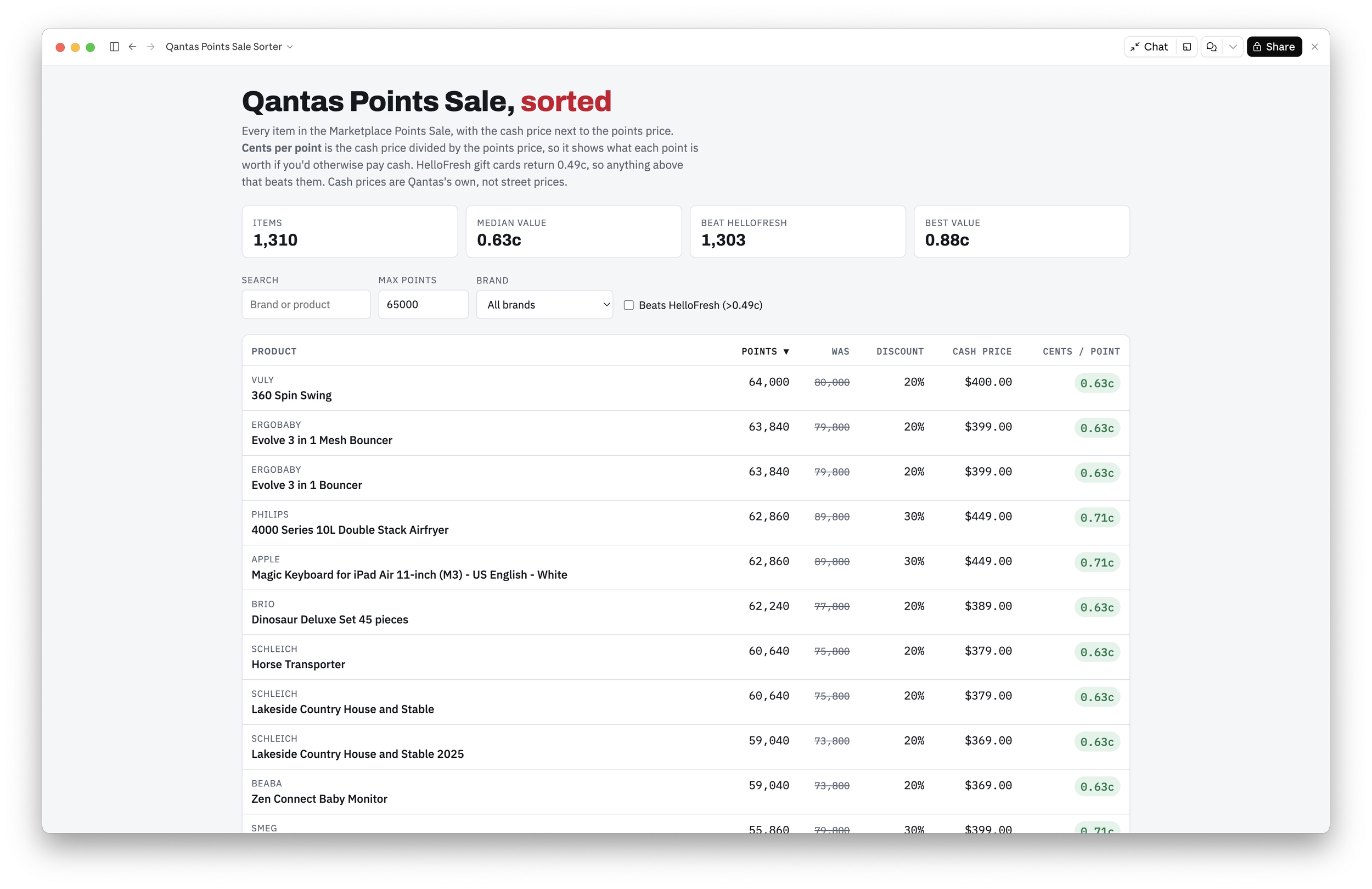
Products sorted by points (within my balance)
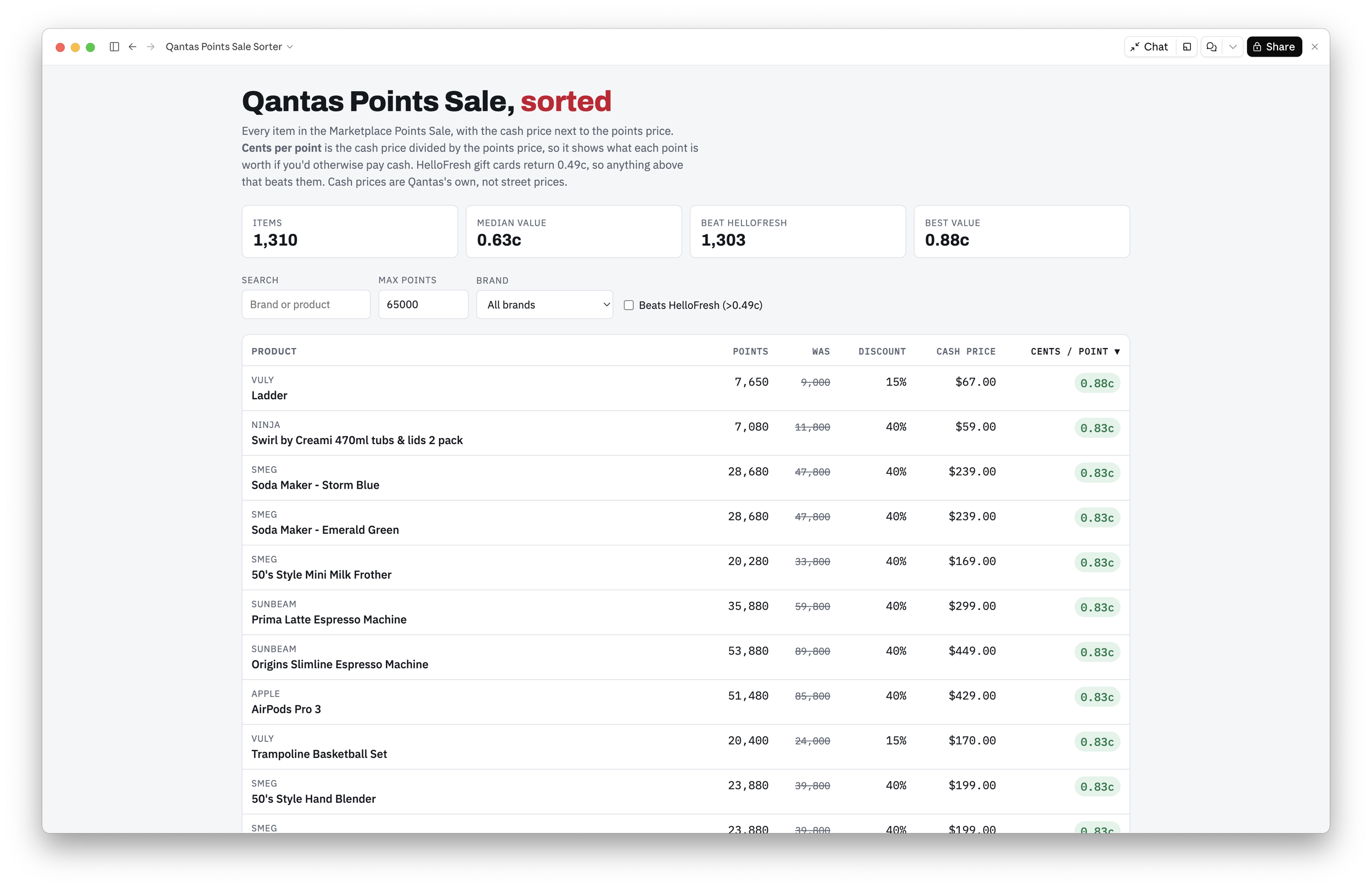
Products sorted by best value
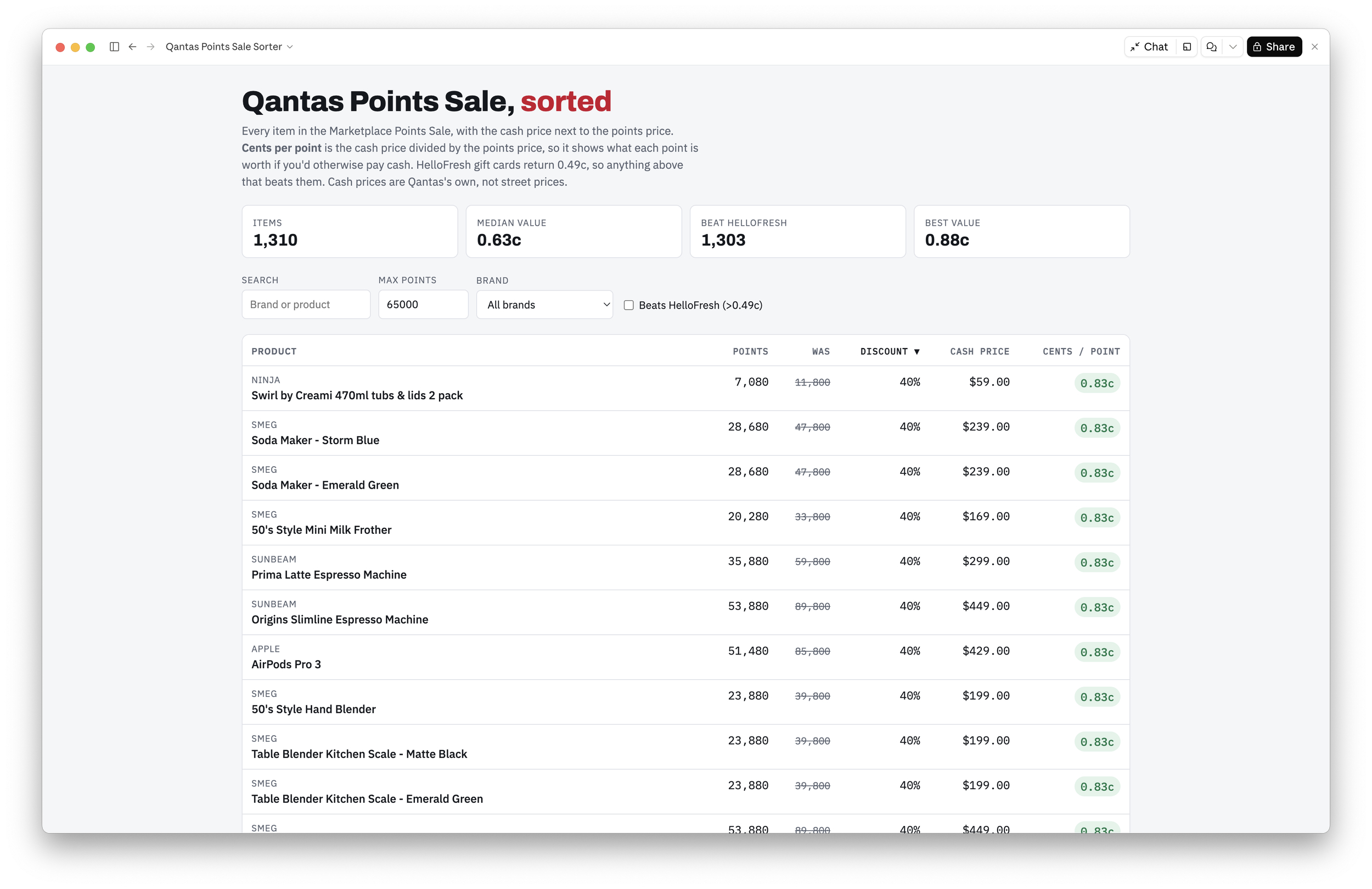
Products sorted by biggest discount
If you want to try this on another website, tailor the prompt accordingly.
PROMPT: "Here's a page I'm trying to make a decision from: [link]. It won't let me [sort / filter / compare] by [the thing you care about]. Pull every listing across all the pages and build me a sortable page with [the column you wish existed]. Go slowly between pages so the site doesn't block you."
FOLLOW-UP PROMPTS:
"Add a filter so I only see items under [budget]."
"Highlight anything better than [your benchmark]."
"Which of these should I check against another store's price first?"
Go slowly, or the site will lock you out
That last line in the prompt is there because of what happened on the first attempt. Claude requested pages several at a time, and ran through the sale more than once while it worked out how to read the prices, until Qantas's bot protection kicked in and every request came back 'Access Denied'.
Claude stopped, told me what had happened, and warned that because the requests came from my home connection, my own browsing might be blocked for a while too. It scheduled a retry for an hour later. I asked it to try straight away, but slowly, and the second run asked for one page every three seconds. All 55 pages came back without a block, it took a few minutes, and Claude cancelled the scheduled retry.
Lesson: put "go slowly" in the prompt from the start.
The missing column changed the answer
Remember Claude's first answer, HelloFresh? Once the page existed, Claude corrected itself and said so plainly. All 1,303 items with a cash price beat HelloFresh's 0.49c per point. The middle of the list sat at 0.63c, and the best items reached about 0.83c.
The useful bit, for me, was that the page turned 1,310 products into a shortlist of things worth checking against a real shop's price.
A grinder I'd have bought anyway beat the vouchers
I'd been thinking about buying a coffee grinder, and the sale had eleven of them, from a $49 Sunbeam up to a $1,499 Smeg Dolce & Gabbana edition. Two stood out: the Breville Smart Grinder Pro at 41,880 points against $349, and the Smeg Minipro at 53,880 points against $449, which would match our other Smeg appliances.
Both came out at 0.83c per point, so I asked Claude to check real shops. JB Hi-Fi had the Breville at $349, the lowest price Claude could find, and Smeg's own store had the Minipro at full price. Amazon has sold the Breville for $239 to $269 in past deals, and even at that price it still comes out ahead of the meal kits.
Here's how my points could split:
| Option | Points | Value |
|---|---|---|
| Six HelloFresh cards | 61,200 | $300 |
| Breville grinder + a $100 HelloFresh card | 62,230 | $449 |
| Smeg grinder + one HelloFresh card | 64,080 | $499 |
On paper the Smeg route comes out $50 ahead, if I already had $449 in my budget for a grinder, but in the end bench space and the lower price point decided it for me. (The Breville is 9cm narrower.)
Your turn: find the column the site is missing
This works on any site where the information is public and the sorting is someone else's choice, as long as its terms allow. The trick is spotting the sort option you'd add if you ran the site.
| Site | What it won't let you do | The column you need |
|---|---|---|
| Qantas Marketplace Points Sale | Sort by price or discount | Cents per point (cash price ÷ points) |
| Your site | Your issue | Your solve |
ACTIVITY: Think of the last time a website's sort menu annoyed you. Fill in a row: the site, what it wouldn't do, and the one number or column that would have made the decision obvious. That column is your prompt.
Build it for tonight and let it go
The page is a snapshot of one evening's prices. It won't update when the sale changes, and it doesn't need to. When the next Points Sale comes around, I can paste the new link in and ask for the same page.
So I'm buying the Breville and a $100 HelloFresh card, which adds up to $449 of things we'd have bought anyway, from the same points that would have only got $300 in meal kits.
FAQ
What are Qantas points worth in dollars?
It depends on what you spend them on. Here's the range from lowest to highest, as of September 2026:
| What you redeem for | Cents per point | 10,000 points is worth |
|---|---|---|
| Woolworths gift card | 0.42c | ~$42 |
| HelloFresh and most other gift cards | 0.46 to 0.50c | ~$46 to $50 |
| Marketplace items at full points price | ~0.5c | ~$50 |
| Marketplace Points Sale | 0.59 to 0.88c | ~$59 to $88 |
| Economy reward flights | ~1 to 2c | ~$100 to $200 |
| Business or first class reward seats | ~2 to 8c | ~$200 to $800 |
The gift card and Marketplace rows come from the listings I pulled. The flight rows are estimates from Cash For My Miles, and they only hold if you'd otherwise have paid cash for that fare.
Do I need to know how to code?
No. The one-line prompt above is all it took to get the page.
Which version of Claude do you need?
I used Claude in the desktop app, which let it read the Qantas pages through its built-in browser pane. Features and plan access change over time, so check what your plan includes.
Is this allowed?
It depends on the site, so read its terms first. The Qantas Marketplace terms allow personal, non-commercial use, don't allow you to republish or distribute the site's content, and ban putting an unreasonable load on the site. That's why the prompt says to go slowly, and why my sorted page stays private and just helped me make one decision. Other shopping sites have similar terms, so treat what you build the same way.