What is Notion AI and how can I use it?
An honest look at what Notion AI can (and can’t) do—blog posts, brainstorms, summaries, poems, and more. Helpful, but still needs a human.
Summary: Notion has an inbuilt AI tool which is useful for some things including brainstorming ideas, writing an article, simplifying or summarising text, creating a job description, writing poetry, and coming up with a pros and cons list.
To get started, you'll just need a Notion account. For now, Notion AI is available on all account types (including the free accounts!), so get it while it's hot 🔥
Notion is a tool that lets you manage projects and personal tasks, and can be used as a knowledge management system as well. Its power is in its flexibility, although the learning curve to get started can be steep, depending on how you're going to use it. If you're new to Notion, check out our other Notion posts for some tips and inspo!
In this video (14min), I take you through a little preview of the Notion AI feature in action and a few things it can do:
Here's what's covered:
0:30 Things Notion AI can do
1:12 Getting started with AI in Notion
1:44 Using the / 'slash' command
1:54 Ask AI the steps for writing a blog post about Notion AI
2:50 Ask AI to brainstorm blog post ideas
3:52 Ask AI to write a blog post about productivity and work-life balance
4:30 Ask AI to extend the post
4:48 Ask AI to simplify the language
5:04 Comparing the first post with the simplified post
6:25 Ask AI to summarise the post
7:32 Showing all Notion AI task options
7:45 Ask AI to write a job description for a senior project manager
8:20 Ask AI to write a poem about life outside the screen
8:50 Ask AI to write an essay about choosing what to learn
9:50 Ask AI to summarise the essay
10:10 Ask AI to come up with pros and cons about working from home
11:10 Ask AI to outline the process for achieving peace in your life
12:00 Caveat on AI blind spots
What can Notion AI help with?
There's a list of suggested AI assist tasks when you've enabled Notion AI and open a blank page, but so far these are the ones I think I'll find most useful:
To do list (steps)
Brainstorm ideas
Write a blog post
Continue writing
Use simpler language
Summarise
Job description
Poem
Essay
Pros and cons list
Outline
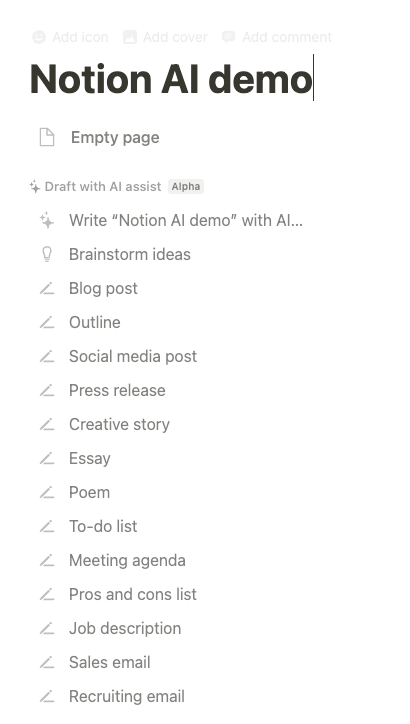
The list of Notion AI starter prompts
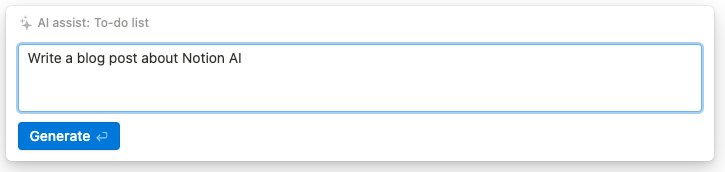
The Notion AI prompt window

Choice of actions once the text has been generated
Notion AI prompt examples
I asked Notion AI to prepare my to-do list for writing this blog post, and here's what came out:
Research Notion AI and its features
Brainstorm ideas for the blog post
Outline the blog post
Write the blog post
Edit and revise the blog post
Publish the blog post
So I had to do task #1 for myself, but to brainstorm ideas... I can use AI for that!
I typed in: What are some unique blog posts I could write about productivity and work-life balance?
And here's what the AI suggested:
Tips for creating a productive home office setup
Strategies for staying organized while working remotely
Ideas for making the most of your time while working from home
How to handle work-life balance while working from home
Ways to combat burnout while working from home
Strategies to create a productive work-life balance
Tips for staying motivated while working remotely
Advice for creating healthy boundaries between work and home
Ideas for managing stress and anxiety while working from home
How to stay focused while working remotely
After a few 'try again' re-prompts, it came up with a blog post idea I liked the look of so I typed in the AI prompt: Managing your mental health while working from home: advice for taking care of your mental health while working remotely
The first blog post was a bit short, so I asked it to 'continue writing' and then finally I used the 'simplify language' option, and here's what came back:
Introduction
Many of us are now working from home and it is important to take care of our mental health. This post will give advice on managing mental health while working remotely.
Establishing a routine
It is important to have a regular start and end time to the working day and to take breaks. This will help stop overworking and give time for other activities.
Taking regular breaks
Take regular breaks throughout the day. This will give a chance to step away from work and clear the mind. If possible, get outside for a walk or exercise. This will break up the day and come back refreshed.
Connecting with colleagues
When working remotely, it is easy to feel isolated from colleagues. Make sure to stay connected with your team. Have regular check-ins with colleagues and socialize outside of work. This will help keep morale high and stay connected.
Making time for yourself
Take time to relax, read, or do an activity. This will help prevent burnout and make sure you are taking time for yourself and your mental health.
Seeking professional help
If feeling like struggling with mental health, seek professional help. Seeking help is not a sign of weakness and can help manage any difficulties. Resources like counselling or therapy can help manage mental health while working from home.
Conclusion
In order to manage our mental health while working from home, it is important to establish a routine, take regular breaks, connect with colleagues, make time for ourselves, and seek professional help when necessary. Taking the time to look after our mental health while working remotely can help us to stay productive and healthy.
Not bad at all! ... but it's still a bit long winded, so I used the 'summarise' AI feature and it came back with:
Working from home can be difficult for our mental health, so it is important to establish a routine, take regular breaks, stay connected with colleagues, make time for ourselves, and seek professional help when necessary. Taking the time to look after our mental health can help us stay productive and healthy.
Thanks, AI. You're not wrong.
A few other prompt ideas:
Job description: Write a job description for a project manager in a digital agency
Poem: Write a modern poem about releasing life is about what happens outside the screen
Essay: How to Know What is the Next Right Thing for You to Learn
Pros and cons: Working from home
And the last one I'll leave you with is that I asked Notion AI to outline the process for achieving peace in your life.
And the AI says:
Identify Sources of Stress
Develop Strategies to Manage Stress
Establish Healthy Habits
Foster Positive Relationships
Practice Self-Care
Reevaluate Your Goals
Prioritize Your Time
Take Time to Reflect
Okay, sure. Prioritise my time, you say? Time to get off the computer. Seeya!
Found a writing rhythm with Notion AI? Imagine if your whole workspace felt this smooth.
AI can be helpful inside your notes and docs. When one part of your workflow clicks, it's easier to focus, create, and move forward with less resistance.
For creatives who want fewer tabs and more flow
The Organised Creative operating system is a Notion template that connects your ideas, tasks, and calendar, so content planning, client work, and admin all live in one place.
EXPLORE THE TEMPLATE →
For anyone who wants systems that stick
The Most Organised Person I Know shows you how to build simple, thoughtful systems that reduce mental load and help your work flow more smoothly. Same smooth feeling you got from Notion AI, applied to your whole workflow.
GET THE EBOOK →
Because when your tools and processes work with you, you can think more clearly and do what you do best.